
Overview
Bits of Good builds software for nonprofits to help them better serve their communities. After these products launch, the Product Maintenance Team continues improving them by identifying pain points and making targeted changes that reduce manual work and simplify everyday tasks.
I worked on fixes for Bagel Rescue and AARF this semester in collaboration with a PM who helped identify issues. I also did usability testing before and after the fixes to ensure the product was improved.
Organization
Bagel Rescue needed improvement to their admin control over volunteers, routes, and delivery locations to greatly reduce friction in doing such tasks.
01
Problem
Currently, admins do not have a streamlined way to delete and edit volunteers without leaving their main flow. This causes friction in daily tasks, slowing down their coordination, and thus reducing impact.

Fix no 1
Added an options entry point with an edit and deletion functionality. This addition would make accessing the editing and deletion easy and from one singular place.


Fix no 2
In addition to a pop-up modal, I also made editing accessible through the volunteer information modal. This creates another route to editing, making the task easily done also when viewing the volunteer's information.


Impact
Reduced the path to editing and deletion by 40% in timed trials, giving the admins a faster way to manage their volunteers without leaving their primary workflow.
02
Problem
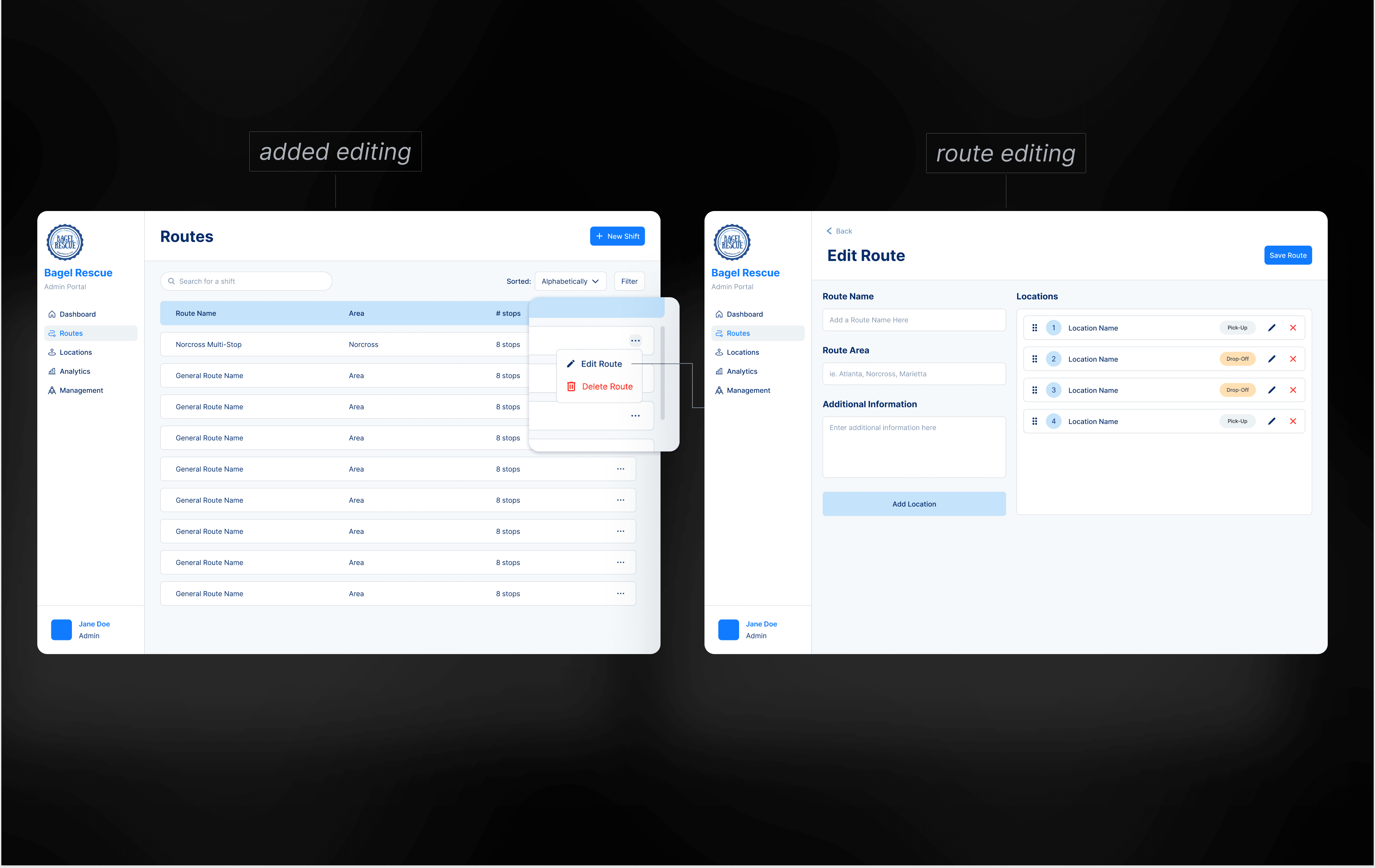
Currently, admins do not have a streamlined way to edit routes as it requires navigating away from the main flow. This also creates friction in day-to-day operations and slows their efforts to coordinate.
Fix
Introduced the ability to edit route from a modal, which takes you to the edit route page, where you can then edit locations.


Impact
Removed the need to delete and recreate routes, reducing route modification time by approximately 40% and preserving operational context
Organization
Atlanta Animal Rescue Friends needed more effective volunteer operations across timesheets, emails, and ID records so staff could manage people faster and with greater ease.

01
Problem
For timesheet tracking, AARF currently uses a piece of paper and manually enters the information into an excel sheet. This is a system that is not optimal as manual entry is slow and time-consuming.

Fix no 1
Transition it into a mobile-first volunteer timesheet that is similar in format to a Google Form, making it on-the-go and intuitive. The admin's side features blocks that populate automatically as timesheets are submitted as well as a search feature in case they want to find a specific timesheet.

Fix no 2
In addition to a mobile interface, I also designed a desktop interface if the users prefer using their desktops to enter in their timesheets or view the volunteer timesheets.

Impact
Made hour review easier to access on the go while keeping desktop admins in context. This sped up the process of timesheet organization by 65% in comparison to its old method of manual entry.
02
Problem
Currently, volunteers are not getting any consistent reminders about their upcoming shifts, resulting in missed shifts and the need for manual weekly reminder emails.
Fix
I created an email that would be easy to automate and scan through. With some preset text, the volunteer name and the shift details are parts that are interchangeable. I sectioned the details so that the most important information can be delivered quickly and at a glance.

Impact
There was a 15% attendance improvement through automating the message and making the message clear and quickly scannable.
03
Problem
Admins managing volunteers in the AARF system currently lack an internal way to delete Volunteer IDs. This has resulted in outdated or incorrect IDs remaining in the system for weeks or months at a time, until a developer at BoG can delete them.
Fix no 1
Added a deletion icon to each ID on the list so that they can delete them directly. I chose red make it distinct and separate from the edit functionality.

Fix no 2
The edit ID modal also has a deletion if they wanted to delete the ID if they are in the editing context.

Impact
Reduced record-management friction through making it simple to delete IDs directly from the software itself and not through BoG.
Takeaways
What this maintenance work taught me
Strong maintenance design is not about adding more UI. It is about finding the smallest point of leverage, clarifying the system around it, and helping users trust the next action.
Communication keeps sprints moving
Clarify confusing tickets early so design and engineering solve the same problem.
Mental models reduce overwhelm
Group dense information into categories users already expect.
Existing flows are assets
New features feel easier when they extend familiar patterns.
